

Stape - Google Tag Manager Server Side
Create a tagging server for your server-side Google Tag Manager container in 1 click.
Presentation
European Server GTM Hosting - With our 100% European-owned cloud servers for sGTM, you can use Google Analytics in a GDPR-compliant way.
Easy setup: One-click tagging server URL set up. Plus, your server Google Tag Manager container is hosted on Google Cloud.
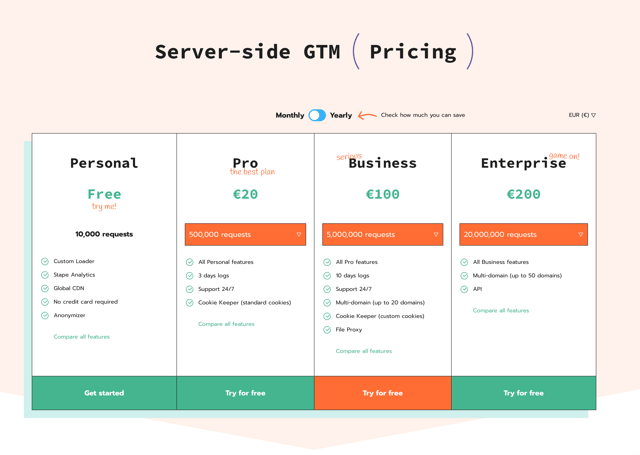
More affordable than Google: Google recommends using at least three cloud servers for the production environment that cost $120/month plus additional fees for traffic. We offer the same setup at just $20/month ($100 per month for sites with more than 500,000 requests/month).
How to create a server container in Stape
1. Log in to your stape.io account and click the Create container button.
2. Enter the following container information:
- Container name - give your container a name (for convenience, we recommend using the same name you gave to the server container in GTM).
- Container configuration - paste the Container Config data that you copied from the Install Google Tag Manager pop-up. If you lost it, go to https://tagmanager.google.com/ → click Admin → click Container settings → copy the string under Container Configuration.
- Server location - for best performance, choose the server location that’s closest to where most of your clients are. See the list of available server locations here. Also, you can opt for the Global multi-zone server location option if you have traffic from different regions. It will automatically route incoming requests to the nearest available zone based on the user’s IP address.
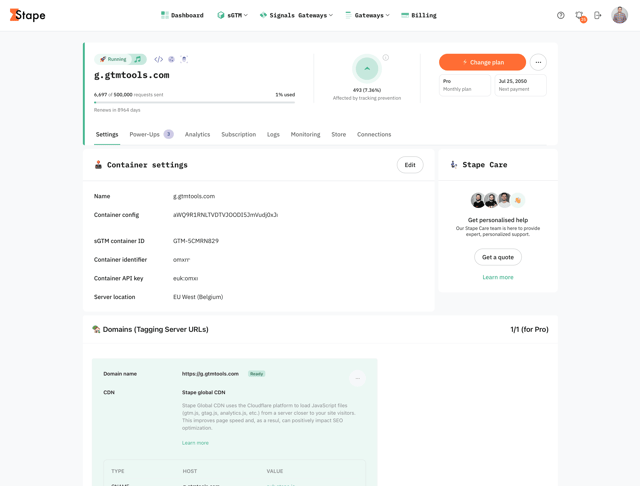
3. Find your container on the Stape Dashboard page. Once its status changes to Running, your Stape sGTM container has been successfully deployed.
Pricing
Check our calculator here
Support
If you have any questions about setting up a tagging server, we are here to assist. You can reach our support team by using community, chat, or email.
Terms and Conditions
Learn more about Terms and Conditions.
Categories
Supported Languages
English