In today’s cloud-native environments, visibility and accountability are critical. Whether you're troubleshooting a service outage, ensuring compliance with data regulations, or optimizing performance, you need the right tools for the job.
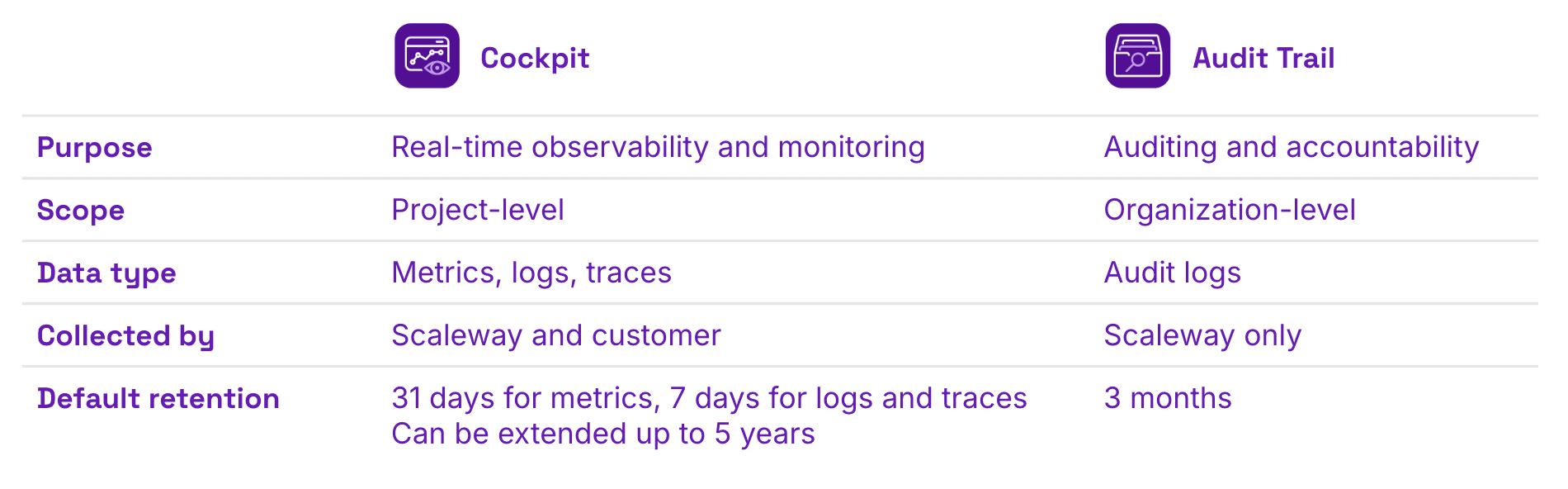
Scaleway offers two complementary solutions, Cockpit and Audit Trail, designed to give you granular and comprehensive control over your infrastructure through monitoring, observability, and auditing.
But how do you know when to use which? This article breaks down the similarities, differences, and best use cases for both tools, helping you choose the right one — or combine them effectively — to meet your team’s goals.
What Is Cockpit?
Cockpit is Scaleway’s centralized observability and monitoring solution. It provides unified, real-time visibility into the health and performance of your cloud infrastructure and applications. It’s ideal for engineering teams — especially DevOps, software developers, and SREs — who need immediate, actionable insights.
Core capabilities include:
- Monitoring key metrics like CPU usage, memory, and network traffic
- Visualizing data across services and resources
- Setting alerts to detect anomalies or performance degradation
- Troubleshooting application issues using logs and metrics
- Spotting under-utilized resources to optimize your cloud spend
Cockpit integrates natively with all Scaleway products except for Bare Metal (see to the full list of product integrations here), offering project-level insights that help teams catch issues early, improve stability, and optimize resource usage.
What is Audit Trail?
Audit Trail, on the other hand, focuses on governance, security, and compliance. It records all user and system actions across your Scaleway organization — such as API calls, user logins, and resource changes — in a tamper-proof log.
Where Cockpit gives you real-time performance data, Audit Trail ensures you have a complete history of who did what, when, and how — critical for audit readiness, incident investigation, and regulatory compliance.
Core capabilities include:
- Logging all user and system actions at the organizational level
- Supporting compliance efforts (e.g., GDPR, PCI-DSS)
- Enabling forensic analysis post-incident
- Providing traceability for operational changes
Audit Trail is a must-have for security and compliance teams, legal stakeholders, and IT operations staff who need to ensure accountability and policy adherence.
Shared Goals, Distinct Functions
While their use cases differ, Cockpit and Audit Trail are built around a shared vision: helping you understand what’s happening in your cloud environment, from system performance to user actions.
When to Use Cockpit vs. Audit Trail — and When to Use Both
As an organization, knowing when and how to leverage both tools is key to having a powerful incident response workflow. Here are some examples:
1. Detecting security incidents
Cockpit helps you spot anomalies in real time, such as spikes in CPU or traffic. If something looks off, Audit Trail allows your security team to trace who accessed what, when, and from where.
A sudden spike in resource usage? Use Cockpit to detect it, and Audit Trail to confirm if it was due to unauthorized access.
2. Ensuring post-deployment reliability
After a new release, Cockpit lets engineering teams monitor performance KPIs like latency and error rates. Simultaneously, Audit Trail confirms that the deployment followed internal change management procedures.
Use Cockpit to check if your app handles load efficiently, and Audit Trail to verify who performed the deployment actions.
3. Investigating unexpected cost increases
Cockpit can help you identify which services and resources are driving up costs based on usage metrics. Audit Trail reveals who scaled up resources or provisioned new instances, helping operations or finance teams understand if the usage was approved.
You notice a cost jump: Cockpit highlights the usage trend, while Audit Trail confirms who initiated the resource changes.
Practical Advice for Cloud Teams
For CTOs and cloud architects
Adopt both tools to maintain a holistic view of your infrastructure. Cockpit ensures your services run smoothly, while Audit Trail keeps your organization secure and audit-ready.
For engineering teams
Use Cockpit daily for performance monitoring and troubleshooting. Set alerts to catch issues before they impact users. Rely on Audit Trail during incidents or reviews to trace actions and ensure accountability.
For security and compliance teams
Integrate Audit Trail into your compliance workflows. Use it to support internal audits and regulatory reporting. Leverage Cockpit to monitor security-related metrics like unusual resource behavior.
Take Action
Observability and compliance aren't optional: they're fundamental. With Cockpit and Audit Trail, Scaleway offers a powerful combination that equips both technical and non-technical teams with the visibility and control they need.
Cockpit helps you understand the "what" and "how" in real time: metrics, performance, and operational health. Audit Trail helps you understand the "who" and "when": user actions, API calls, and change history.
Together, they deliver a complete picture of your cloud environment, helping your organization stay reliable, secure, and compliant.
Want deeper insight into your applications and infrastructure? Explore what Cockpit and Audit Trail can do for you.
Register for ai-PULSE 2025
ai-PULSE, Europe’s premier Artificial Intelligence conference powered by Scaleway, is returning!
Gathering key players from across Europe, the event will be back once again at STATION F on December 4 for a unique blend of deep technical expertise and crucial business insights.
You’ll hear from:
- Micah Hill-Smith, Co-Founder & CEO of Artificial Analysis, on which metrics truly matter in the new AI stack
- Boris Gamazaychikov, Head of AI Sustainability at Salesforce, on how we can make “energy-efficient” AI measurable
- Pauline Pham, Strategy & Operations at Dust, on building and orchestrating agentic fleets
... and dozens more leaders and engineers shaping the technology’s future.
Whether you’re planning to attend in-person or online, make sure to register!