Understanding and preparing for Public Gateways v2
This document explains changes that took effect for the Scaleway Public Gateway Product as it migrated to v2 in 2025.
Summary (TL;DR)
Until the second half of 2025, all Scaleway Public Gateways were created and managed with the version 1 of the Public Gateways API, either explicitly via the API itself, or implicitly behind the scenes of the Scaleway console or other developer tools.
We then deprecated v1 of the API and transitioned to v2.
| PGW API v1 | PGW API v2 | |
|---|---|---|
| Supports legacy-mode PGWs | Yes ✅ | No ❌ |
| Supports IPAM-mode PGWs | Yes ✅ | Yes ✅ |
| Supports SSH bastion allowed IPs, and future new features | No ❌ | Yes ✅ |
| Deprecated? | Yes ✅ | No ❌ |
| Removal date | 3 Nov 2025 | --- |
| Compatible with PGW management via Scaleway console? | Only until 3 Nov 2025 | Yes ✅ |
After a deprecation period ending on 3 Nov 2025, the Public Gateways API v1 and associated developer tools were removed.
What you were prompted to do before 3 Nov 2025:
-
Ensure that your Public Gateway is in IPAM mode. Only IPAM-mode gateways are compatible with v2.
-
Put any non-IPAM mode (legacy) Public Gateways in IPAM mode by doing one of the following:
- Use the Move to IPAM mode button in the console
- Use the dedicated API call.
- Use the
move_to_ipamflag in Terraform
-
Update any code or scripts you have that call version 1 of the Public Gateways API, so that they call version 2 instead, and do not refer to removed functionalities.
If your Public Gateway was already in IPAM mode, and you only managed it via the console, you were not affected by these changes and you did not need to take any action.
Background: DHCP and IPAM
When Scaleway originally introduced Public Gateways, they provided DHCP functionality for resources on attached Private Networks. With the arrival of Scaleway VPC in 2023, DHCP was moved from Public Gateways to Private Networks themselves.
Scaleway also introduced IPAM to act as a single source of truth for the IP addressing of all Scaleway resources. DHCP uses IPAM to ensure consistent and reliable addressing across all Private Networks.
When you create a Private Network, you can either automatically generate a default IPv4 CIDR block, or define a custom block. A default IPv6 block is automatically created. When you attach resources to the Private Network, they automatically receive an IPv4 address (and, if compatible, an IPv6 address) from this block. Alternatively, you can reserve a specific IP address from the block, and specify this address when attaching the resource.
Whether you choose a custom or default CIDR block, automatic address assignment or use a reserved address, the resource's private IP address does not risk changing unless you detach the resource from the Private Network. To ensure that you can keep the same address for a resource even after detaching it, use the reserve IP functionality.
Introducing Public Gateways API v2
Since the assignment and management of IP addresses on Private Networks is now managed by IPAM and the Private Networks themselves, we had to complete the removal of the DHCP functionality from Public Gateways. This meant releasing a new version (v2) of the Public Gateways API, which previously retained a number of legacy DHCP functions. From this new version, you can observe:
- IPAM mode becomes default
- Removal of the DHCP object
- Removal of the
addressfield - Removal of DHCP entries
- New SSH bastion feature: Allowed IPs
Full details of each change are explained below.
IPAM mode becomes default
Scaleway Public Gateways had previously been either in Legacy mode or IPAM mode. You could see the mode of a given gateway by:
- Checking its badge in the gateway listing page of the Scaleway console (see screenshot below).
- Checking the value of the
is_legacyfield via the Public Gateways API.
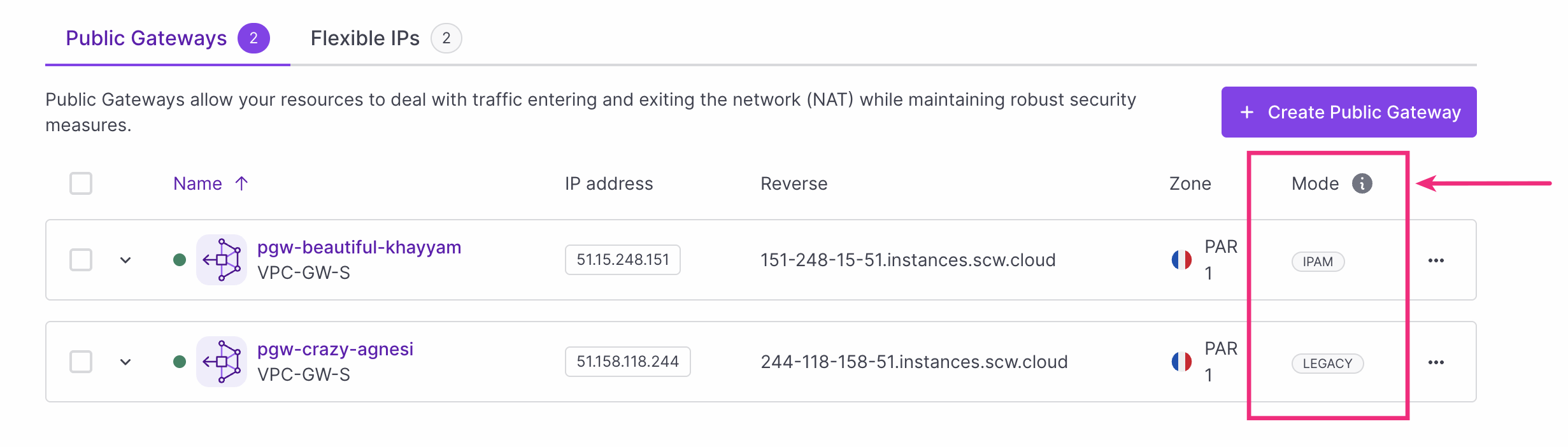
Legacy Public Gateways used a workaround to ensure IPAM compatibility. IPAM-mode Public Gateways are fully integrated with Scaleway's IPAM, which manages the coherent assignment of IP addresses to the gateway itself, and resources on attached Private Networks.
Legacy mode was deprecated, and incompatible with v2 of the Public Gateway API. It is no longer possible to create legacy-mode Public Gateways, all new gateways will necessarily be in IPAM mode.
If you still have a legacy gateway, you had to transition it to IPAM mode so that it is compatible with v2 of the API. This updated the auto-calculated is_legacy field and put your gateway in IPAM mode.
Removal of the DHCP object
The DHCP object remained present in v1 of the API, despite the migration of DHCP to Private Networks, which replaced DHCP on Public Gateways.
The DHCP object does not exist in v2 of the API. Instead, IPAM configuration, where auto-configuration of GatewayNetwork is managed by IPAM and DHCP is managed by Private Networks, replaces any need for DHCP configuration via the Public Gateway.
Remember that you can define a custom CIDR block for a Private Network at the time of creation, and use reserved IP addresses with IPAM when attaching both standard and custom resources.
Removal of the address field
For some time, this functionality was available via the API and developer tools only (not the Scaleway console).
When attaching a Public Gateway to a Private Network (creating a Gateway Network) via the API, you could use the address field to define a single static IP address to assign to the Public Gateway on that Private Network.
The address field does not exist in v2 of the API. Instead, you can pass an ipam_ip_id to specify a reserved IP address to use for a Public Gateway on a Private Network, if you wish. On the Scaleway console, you can select a reserved IP to use when attaching a Public Gateway to a Private Network. Otherwise, use the default behaviour where IPAM auto-assigns an IP address from the Private Network's CIDR block to the Public Gateway at the moment of attachment.
When you use a dedicated method to move a legacy Public Gateway to IPAM mode, it will keep its current IP address on all attached Private Networks.
Removal of DHCP entries
For some time, this functionality was available via the API and developer tools only (not the Scaleway console).
DHCP entries could be created, belonging to a specified GatewayNetwork (Public Gateway / Private Network attachment), holding dynamic DHCP leases or static, user-created DHCP reservations. They have effectively allowed the Public Gateway to assign certain IP addresses to certain resources on the Private Network.
DHCP entries do not exist in v2 of the API. Instead, you can rely on the default IPAM/DHCP functionality as described above. The default behavior auto-assigns IP addresses to resources on the Private Network from the network's CIDR block, or you can use the IP reservation functionality to specify the IP address(es) to assign to each resource.
For custom resources, such as VMs hosted on Elastic Metal servers, we now provide dedicated functionality for attaching these to Private Networks. When choosing the Custom Resource type, you can specify a MAC address and hostname at the moment of attachment.
We automatically migrated any existing DHCP entries to IPAM for you, at the moment you put a legacy Public Gateway into IPAM mode.
SSH bastion allowed IPs
Allowed IPs is a new functionality of the Public Gateways API v2, that is also available to all IPAM-mode Public Gateways via the Scaleway console. This feature allows you to specify a list of IP address ranges which should be allowed to connect to the gateway's SSH bastion and the resources behind it. All other IP addresses will be blocked from connecting. Find out more in the SSH bastion documentation.
Timeline and action to take
-
March 2025 - V2 release: The Public Gateway v2 API was released, co-existing with v1.
-
8 April 2025 - V1 deprecation: The Public Gateway v1 API was deprecated. Deprecation means that the API still functioned, but was slated for removal, and we did not recommended that you keep using it.
-
8 April 2025 - 3 Nov 2025: Migration period: You had a six month migration period to complete the following actions
- Ensure that your Public Gateway was in IPAM mode. Only IPAM mode gateways would be compatible with v2.
- Put any non-IPAM mode (legacy) Public Gateways in IPAM-mode, by using the Move to IPAM mode button in the console, the dedicated API call, or the
move_to_ipamflag in Terraform. - Ensure that DHCP was activated on all Private Networks attached to your IPAM-mode Public Gateways.
- Update any code or scripts you had that called version 1 of the Public Gateways API, so that they called version 2 instead. This included removing any use of the DHCP entries, DHCP objects or address fields as mentioned above.
If your Public Gateway was already in IPAM mode, and you only managed it via the console, you were not affected by these changes and you did not need to take any action.
-
3 Nov 2025 - V1 removal: The Public Gateway v1 API was removed. Any code or scripts still pointing to v1 have ceased to function. We have automatically put all existing legacy Public Gateways into IPAM mode.
FAQ
How do I move my legacy Public Gateway to IPAM mode?
You were previously invited (during the migration period) to do this in several ways:
- Use the Move to IPAM mode button in the console
- Use the dedicated API call.
- Use the
move_to_ipamflag in Terraform
As of 3 November 2025, all legacy Public Gateways were automatically put into IPAM mode by Scaleway.
What happened when mu legacy Public Gateway was moved into IPAM mode?
We detached your Public Gateway from all attached Private Networks, and reattached it in IPAM mode. This entailed downtime of about 10-20 seconds. We ensured that the IP address used for the new attachment was the same as the old one.
My Public Gateway is now in IPAM mode, do I need to take any action?
If you only manage your gateway via the Scaleway console, you do not need to take any action once your gateway is in IPAM mode.
If you have any code or scripts that still call v1 of the Scaleway Public Gateways API, you must update these to point towards v2. v1 has been removed as of 3 November 2025.
What if I want to keep using my custom gateway DHCP configuration from v1 of the API?
These functionalities are no longer available.
Going forward, we expect users who were previously using custom DHCP with a Public Gateway to move to the standard set-up of IPAM and Private Networks' inbuilt DHCP for private IP assignment. Remember that you can define a custom CIDR block for a Private Network at the time of creation, and use reserved IP addresses with IPAM when attaching both standard and custom resources.
I use Terraform to manage my Public Gateway, what should I do?
If you use Terraform to manage your infrastructure as code, ensure that you are not using any functionality associated with v1 of the API (DHCP objects, DHCP entries or the address field). If necessary, modify your templates to reattach your Public Gateways in IPAM mode with the move_to_ipam flag, and use IPAM functionality to replace any DHCP configurations.
resource "scaleway_vpc_public_gateway" "main" {
  name          = "foobar"
  type          = "VPC-GW-S"
  ip_id         = scaleway_vpc_public_gateway_ip.main.id
  move_to_ipam  = true
}
Refer to our Terraform migration guide for full details and help moving legacy gateways to IPAM mode.
Further help and support
If you have any questions, get in touch with us on the #public-gateway channel on the Scaleway Slack Community, or open a support ticket.
The following documentation resources may be useful to you:
- Public Gateway API Documentation
- Public Gateway Main Documentation
- IPAM API Documentation
- IPAM Main Documentation
- Moving a Public Gateway from Legacy mode to IPAM mode with Terraform