My custom domain is in error status after adding it to a Serverless Function
Problem
Custom domain in error status when adding a custom domain to my Serverless Function.
Causes and solutions
When adding a custom domain to a Serverless Function, the following tasks are performed on Scaleway's side:
-
Configure the custom domain on our gateways, so that they can handle traffic for that custom domain.
-
Ensure that the custom domain points to one of the Serverless Function existing endpoints: either the default one
....functions.fnc.<region>.scw.cloud, or an existing custom domain. -
If step 2 is OK, generate a dedicated TLS certificate for that custom domain so it can answer to HTTPS requests.
During the configuration of a custom domain (pending status), callers will likely receive HTTP 404 errors, while our gateways are reconfiguring themselves.
The last 2 steps above are done simultaneously with a HTTP-01 challenge. If that challenge does not succeed after 3 minutes:
- The custom domain will be put in
errorstatus. - The custom domain will not be reachable (in HTTP or HTTPS).
- No TLS certificate will be generated.
HTTP-01 challenge failure (and by extension, a custom domain in error status) can happen for the following reasons (outside of internal errors):
| Problem | Cause | Solution |
|---|---|---|
| DNS record is not correctly configured. | If the DNS record (mostly CNAME) is misconfigured on your DNS provider side, and the custom domain to the Serverless Function default endpoint, we will not be able to configure the custom domain. | Ensure that on your DNS provider, a CNAME record links your custom domain to the Serverless Function. To test, you can run the following command: dig <your_custom_domain> (or nslookup), and make sure that the value returned is a CNAME record to <your_function>.functions.fnc.<region>.scw.cloud. |
| DNS record is not available yet. | This can be the case if the custom domain is created immediately after the CNAME is configured on your DNS provider side. | Wait a few minutes after creating the CNAME on your DNS provider, or at least wait until the DNS record is available on main resolvers (1.1.1.1, 8.8.8.8). |
| DNS cache is stale (still pointing to an old endpoint). | If the custom domain was pointing to another endpoint before adding the CNAME record to the Serverless Function, and if the TTL is greater than the maximum time of the check (3 min), it can sometimes happen that the custom domain still resolves to the old endpoint, thus making the challenge fail. | Wait until DNS entry is available and use a smaller TTL. |
| Negative DNS cache is stale | If the initial check fails (DNS record is not available yet), and the negative TTL configured on your DNS provider side is high, the negative TTL will prevent subsequent checks from querying the nameserver again, until it expires. Depending on the negative TTL configured, this can take more or less time. | Either reduce the negative TTL in your DNS provider configuration, or just wait until you are sure DNS record is available. If you already tried to add the custom domain and faced this issue, you likely have to wait for the negative TTL to expire before making another attempt (so the cache can also expire on our side). |
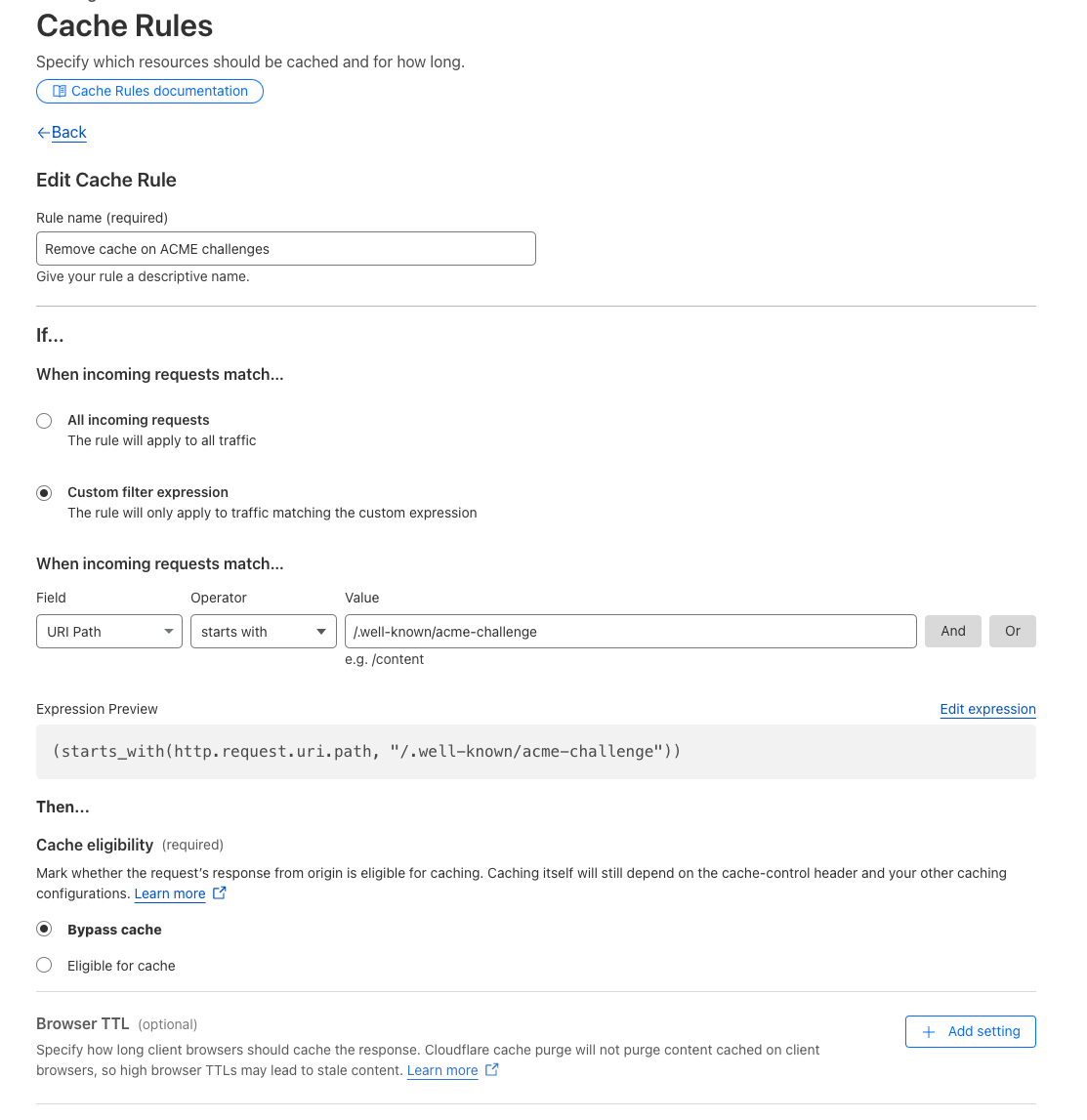
Route /.well-known/acme-challenge is not handled correctly. | To perform the HTTP-01 challenge, a call will be made on <your_custom_domain>/.well-known/acme-challenge/<token>. If you are using a proxying/caching tool (like Cloudflare) between the custom domain and the Serverless Function endpoint, a cached version of that route can be served, making the check fails. | Do not configure caching rules for routes starting with /.well-known/acme-challenge. Refer to the example below with Cloudflare. |
CAA record prevents us from issuing a TLS certificate. | If a CAA record is configured for your domain, it must allow Let's Encrypt to issue a certificate for your domain. Otherwise, the custom domain will be configured, but the TLS certificate will not be generated, and HTTPS requests will fail. | Ensure that if a CAA record is configured for your domain, it allows Let's Encrypt to issue a certificate for your domain. For example, you can add the following CAA record: 0 issue "letsencrypt.org". |
Example of configuration on Cloudflare to disable caching with "Cache rules":