Understanding Public Gateways
This document covers the features, use cases, pricing, and technical details of Public Gateways.
Overview
Scaleway Public Gateways facilitate secure internet access for your resources deployed within Private Networks.
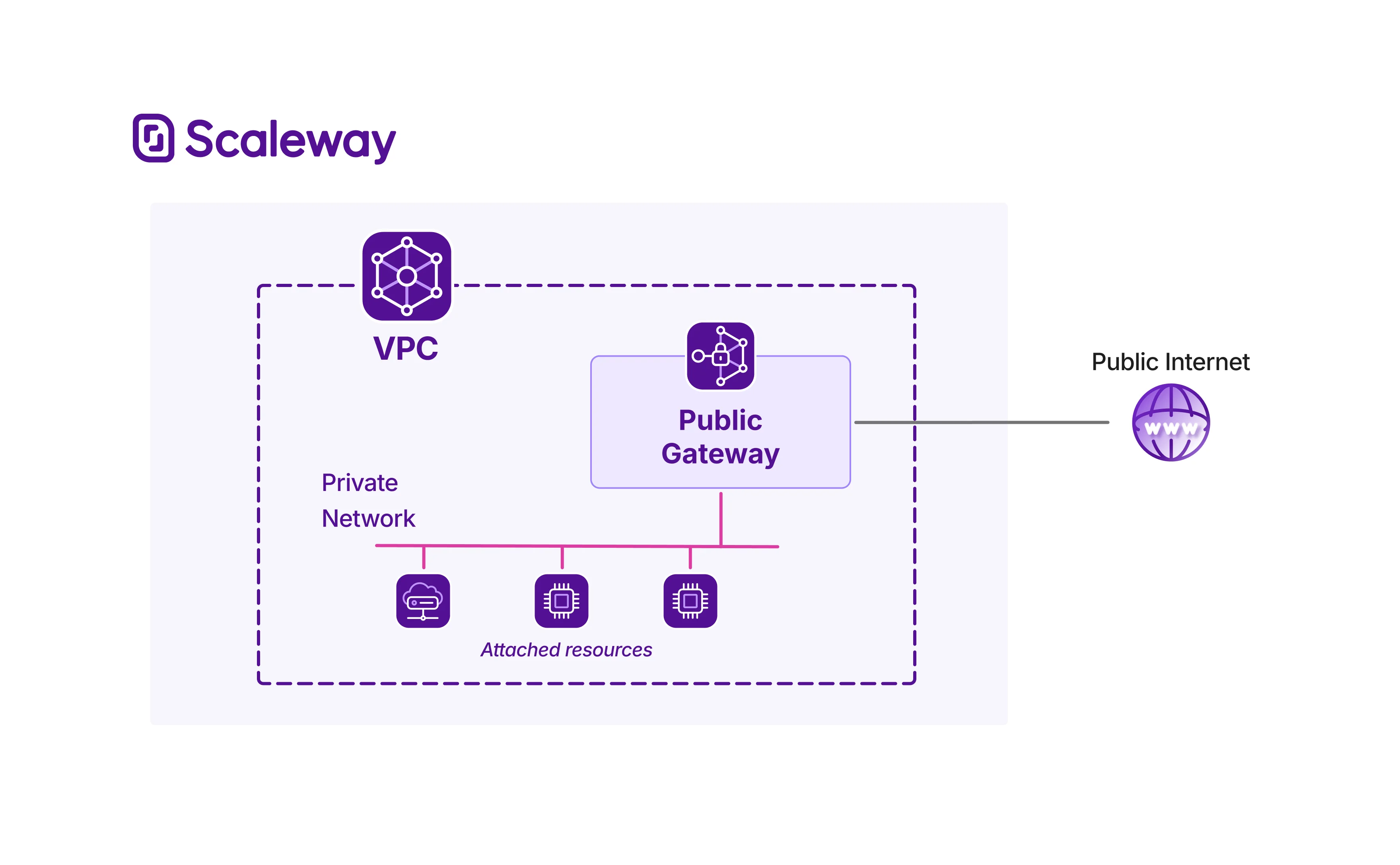
A Public Gateway is a managed network component that connects a Private Network to the public internet. It functions as a gateway node, performing several key networking tasks, including traffic forwarding, NAT (Network Address Translation), and SSH bastion services. Public Gateways enhance security by letting you keep resources in Private Networks while still securely accessing the internet.
Outbound internet access via route advertisement and dynamic NAT
You can set the Public Gateway to advertise a default route, meaning that all outbound internet traffic from resources on the Private Network is automatically sent to the Public Gateway.
Enabling dynamic NAT means that as such traffic reaches the gateway, the origin resource's private IP address (and a unique port) are automatically mapped and translated to the Public Gateway's public IP address and an ephemeral port. This allows the traffic to be securely routed on the public internet, and ensures the gateway can correctly route return traffic back to the original requester.
Inbound internet access via static NAT
Go further by configuring static NAT to permanently expose a single resource in the Private Network to the internet. You can create multiple static NAT configurations to map specific private IP address/port combinations to the Public Gateway's public IP address and a port. This is ideal for resources hosting services that need to be reachable from the internet (inbound connections), and provides predictable, addressable connectivity beyond the ephemeral nature of dynamic NAT.
Administrative access via SSH bastion
Public Gateway's SSH bastion feature allows you to establish secure SSH connections to resources in a Private Network, even after you have removed their public IP addresses. The bastion server serves as a controlled entry point for SSH access to resources in the Private Network.
Activating SSH bastion imports all SSH keys from your Scaleway Project, creating a single entry point. You can then connect to resources within the same Private Network as the Public Gateway, via the bastion. This makes management of your infrastructure easier and more secure, as you do not need to expose your resources to the internet in order to connect to them, nor do you need to upload SSH keys to individual resources.
The SSH bastion feature also allows you to restrict access to the bastion by configuring allowed IP addresses, adding an extra layer of security to protect your private resources.
Use cases
| Use case | Description |
|---|---|
| Enhance security through network isolation | Run sensitive services and store confidential data on resources attached to a Private Network, without public IP addresses exposing them to the internet. Attack surface and risk of unauthorized access are reduced as there is no direct entry point, while resources can still securely download updates and send logs via the Public Gateway. |
| Reduce costs by stripping resources of public IPs | Remove public IPs from resources and connect them via a Private Network with a Public Gateway to enhance security and reduce costs. Private IP addresses are not billed by Scaleway, whereas public (flexible) IP addresses attract an hourly billing rate. A Public Gateway with a single public (flexible) IP address can securely "share" that address with multiple private resources, thanks to dynamic and static NAT. |
| Optimize administrative connectivity | Engineering teams often need secure administrative access to large numbers of private resources in a Private Network. SSH bastion provides a secure, single point of entry to these private resources. This makes management of your infrastructure easier and more secure, as you do not need to upload each engineer's SSH key to each individual resource: all SSH keys held in your Project are automatically imported to the SSH bastion. |
Technical info: requirements and availability
This section sets out how you can use the Public Gateway with other Scaleway resources, and details its availability, compatibility and limitations.
Requirements
You can create a Public Gateway as soon as you have created your Scaleway account and added a payment method.
Remember that a Public Gateway is functionally useless until it is attached to a Private Network.
In practical terms, you will need to create a VPC, then create a Private Network inside the VPC. You can then attach the Public Gateway to the Private Network, along with other resources such as Instances, Elastic Metal servers, etc. The Public Gateway can then provide secure internet access to the other resources on the attached Private Network.
Availability
Public Gateways are available in multiple different Availability Zones. For the most up-to-date information, check out the Scaleway console or the Product Availability page.
Limitations and compatibility
- Public Gateways currently support only IPv4. This means a Public Gateway can have only a public IPv4 address, and can only forward IPv4 traffic.
- Public Gateways can forward traffic for all resources that are compatible with Scaleway Private Networks.
- Static NAT is not compatible with Managed Databases for PostgreSQL and MySQL.
Pricing
Public Gateways are priced at an hourly rate. The rate differs based on the Public Gateway offer type you choose. Offer types vary by bandwidth, i.e. the maximum data transfer capacity the gateway can handle at any given time. The higher the bandwidth capacity, the higher the hourly rate. You can upgrade your Public Gateway to a more powerful offer type at any time.
You are billed for a Public Gateway from the moment you create it, until you delete it. You can delete a Public Gateway at any time. Note that the public flexible IP of a Public Gateway incurs separate billing to the gateway itself.
For full pricing details, see our dedicated pricing page
Features
Public Gateway offers the following features:
- Advertisement of a default route (enable/disable) - let other resources on the Private Network automatically find a route to the internet via the gateway.
- Dynamic NAT (enable/disable) - automatic mapping of resources' private IPs/ports to the Public Gateway, allowing secure routing of outbound traffic on the internet, and ensuring return traffic is routed back to the original requester.
- Static NAT (manually add multiple NAT rules) - map specific private IP address/port combinations to the Public Gateway, to permanently expose resources to the public internet for inbound traffic.
- SSH bastion (enable/disable, and configure allowed IPs) - maintain a single point of administrative access to resources behind a Public Gateway.
- Upgrade Public Gateway to a more powerful offer type.
Going further
Ready to get started with Public Gateways? Check out these pages:
- Public Gateways Quickstart - Learn how to set up and configure your Public Gateway via the Scaleway console.
- Public Gateways API Reference - Full documentation for managing Public Gateways via the Scaleway API.
- Public Gateways Terraform Documentation - Integrate Public Gateways into your infrastructure as code with the Scaleway Terraform Provider.
- Public Gateways Troubleshooting - Solve any problems you run into with the Public Gateway with our troubleshooting guides.
- Public Gateways FAQ - Get answers to the most frequently asked questions about the Public Gateway.