Understanding VPC Peering
This document covers the features, use cases, pricing, and technical details of VPC Peering.
Overview
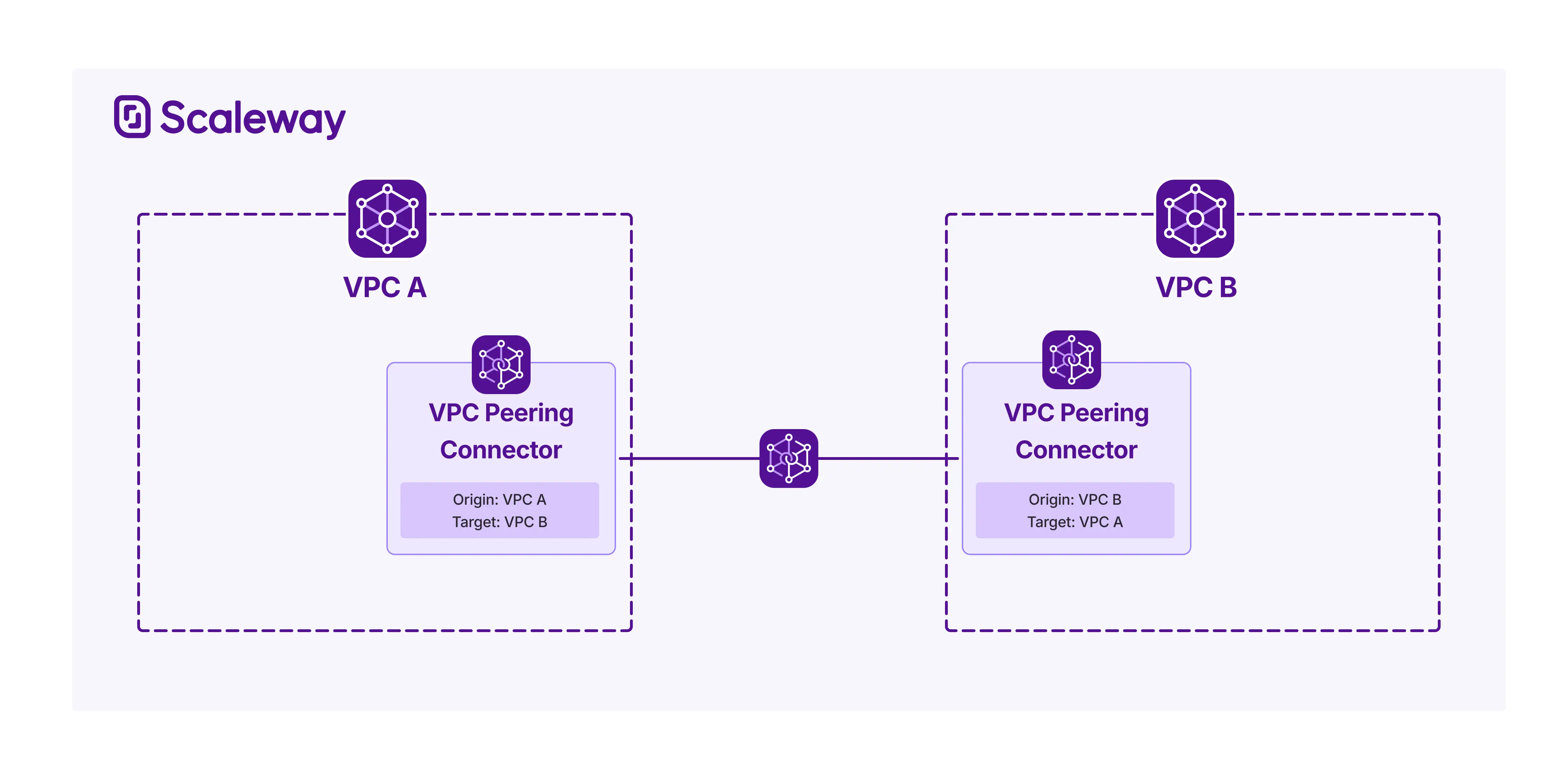
Scaleway VPC Peering is a networking service that enables two Scaleway VPCs to establish a private peering connection. You can then securely route traffic between them, away from the public internet.
Peer with VPCs from other Scaleway Organizations
VPCs do not need to be in the same Scaleway Organization or Project in order to be peered. VPC Peering lets you connect a Scaleway VPCs with any other Scaleway VPC, whether it is in the same Project or Organization, or a different one. The only restrictions are that the two VPCs must be in the same Scaleway region, and must not contain Private Networks with overlapping CIDR ranges.
Ensure security with our matching connector model
An owner or manager of each VPC must independently create a peering connector towards the other, in order for a peering connection to be established. This ensures that peering connections are always mutually consented and prevents unauthorized network access.
The system is designed to protect privacy and avoid information leakage: when creating a peering connector, you must specify the target VPC to peer with by its unique VPC ID, but no additional information about that VPC (such as its configuration, resources, or network topology) is revealed during the process. No requests or notifications are sent between Organizations: both sides must independently create matching connectors using each other's VPC IDs as target. This ensures privacy, while still enabling secure, decentralized connectivity between independent Organizations.
Use custom routes to route traffic
Once two VPCs are peered, you must create custom routes to enable traffic to flow across the peering connection. These routes are not managed by Scaleway, and are not created automatically. Creating custom routes lets you precisely control the traffic flow between the peered VPCs, by defining specific destination IP ranges that should be routed through the peering connection. This gives you full flexiblity to implement your desired network topology and segmentation policies.
Each side of the peering connection must independently create their own custom routes in their VPC's route table - these are not shared automatically between the peered VPCs.
Use cases
| Use case | Description |
|---|---|
| Securely connect across teams and organizations | Enable secure connectivity between VPCs across your Organization, even when they reside in distinct Scaleway Projects aligned with separate departments or business units. Take it further, and peer with VPCs in different Organizations, such as those of trusted partners, facilitating secure, private communication across company boundaries. |
| Build hybrid application architectures across Organizations and Projects | Allow applications to be distributed across multiple Scaleway Projects while maintaining Private Network connectivity. For example, a frontend application in one Project can securely communicate with backend services in another Project, enabling team autonomy and separate billing while preserving low-latency communication across Private Networks. Each team maintains control over their own network configuration and routing. |
| Implement a secure Hub and Spoke architecture | Create a centralized networking model where a "hub" VPC acts as a connectivity gateway for multiple "spoke" VPCs containing workloads. The hub VPC can provide shared services like security inspection, logging, or access to external networks, while each spoke VPC remains isolated. Using VPC Peering, each spoke connects to the hub through independent peering connectors, with each connection requiring mutual consent. This architecture provides centralized control while maintaining separation between different environments or teams. |
Technical info: requirements and availability
This section sets out what you need to do to set up peering connections, as well as detailing availability, compatibility and limitations.
Requirements
You can create a VPC Peering connector as soon as you have created your Scaleway account, added a payment method, and created at least one VPC.
You must be the owner of the VPC, or have the correct permission sets in order to create a peering connector where it is defined as origin. You also need to know the unique VPC ID of the target VPC you want to peer with. Older VPCs must have activated routing for successful peering.
After you create a peering connector where your VPC is defined as origin, and another VPC is defined as target, an owner or manager of the target VPC must create a matching connector, where their VPC is origin, and your VPC (specified by its VPC ID) is target.
Once the two VPC peering connectors are created and Scaleway detects a match, a check is carried out to ensure compatibility. As long as the two VPCs do not contain Private Networks with overlapping CIDR ranges, the two VPCs are connected and their connectors each show a status of Peered.
Finally, you must create custom routes to facilitate traffic routing across the peering connection.
Availability
VPC Peering connectors are a regional resource, and are available in multiple regions. For the most up-to-date information, check out the Product Availability page.
Limitations and compatibility
- VPCs must be in the same region in order to be peered.
- You must know the VPC ID of the target VPC you want to peer with, in order to create a peering connection.
- You must create custom routes in order to route traffic across a peering connection. Traffic will not be routed between them automatically or via any auto-created, managed routes.
- All resources which are compatible with VPC routing are also compatible with VPC Peering, and traffic can be routed across a peering connection to and from these resources.
- Transitive peering is limited to four hops.
Pricing
Billing for VPC Peering does not start until two matching, compatible connectors are detected and enter a Peered state. Unmatched or incompatible connectors in an Orphan or Conflict state are not billed.
Once billing begins, each peered connector is billed at a fixed hourly rate. The cost of the peering is therefore 'split' between both sides. Traffic is unlimited: no caps or rate-limits apply.
Features
VPC Peering offers the following features:
- Connect any two Scaleway VPCs - as long as they are in the same region, and do not have overlapping CIDR blocks. The VPCs can be in the same Scaleway Project / Organization, or different ones.
- Finely control traffic flow via custom routes - create custom routes to define the specific IP ranges that should be routed across the peering connection (IPv4 and/or IPv6).
Going further
Ready to get started with VPC Peering? Check out these pages:
- VPC Peering Quickstart - Learn how to set up and configure VPC Peering.
- VPC Peering API Reference - Full documentation for managing VPC Peering via the Scaleway API.
- VPC Peering Terraform Documentation - Integrate VPC Peering into your infrastructure as code with the Scaleway Terraform Provider.
- VPC Peering Troubleshooting - Solve any problems you run into with VPC Peering with our troubleshooting guides.
- VPC Peering FAQ - Get answers to the most frequently asked questions about VPC Peering.