Understanding Edge Services routing and multi-backend
Edge Services' new routing feature allows you to add multiple backends (previously termed origins) to a single pipeline, and route traffic towards them using path and method-based rules. This new setup also facilitates separate WAF policies per backend, so you can choose which backends need a firewall and configure different levels of protection for each.
Multi-backend pipelines
Previously, each Edge Services pipeline supported only a single backend (origin): either a Load Balancer or an Object Storage bucket.
All requests towards the pipeline's endpoint were automatically routed to this backend. Requests passed through various stages, based on the various features you chose to activate, such as TLS/SSL authentication (for customized endpoints), caching, and WAF.
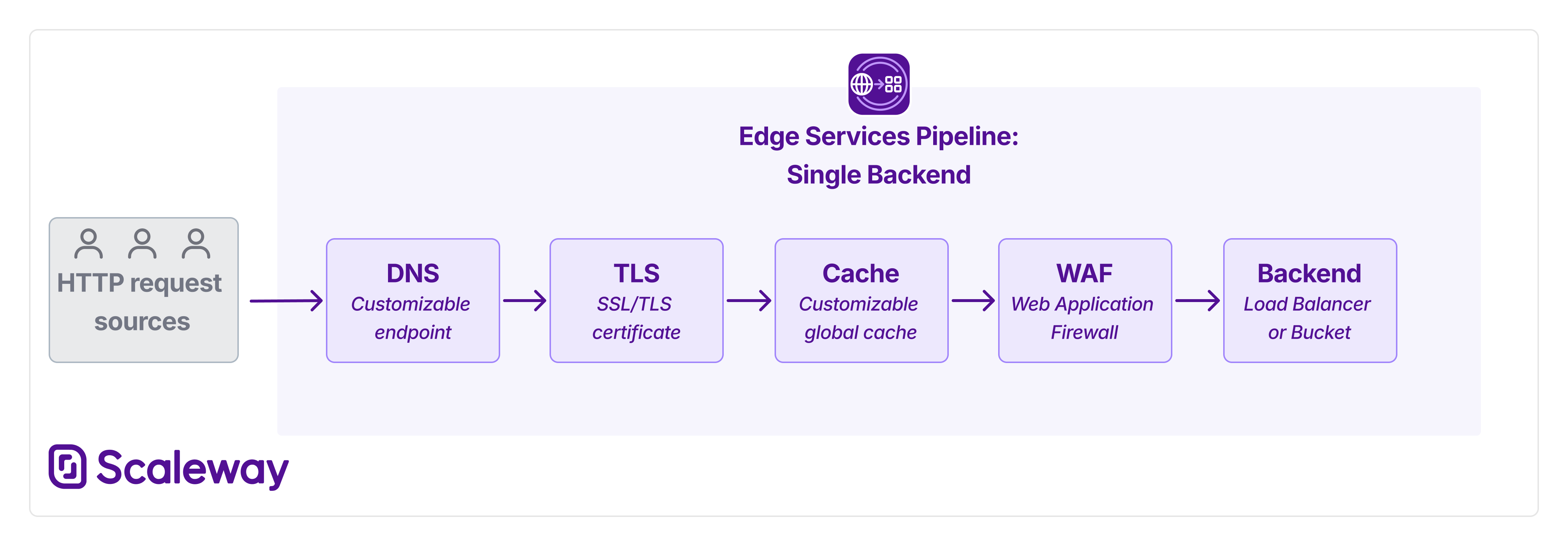
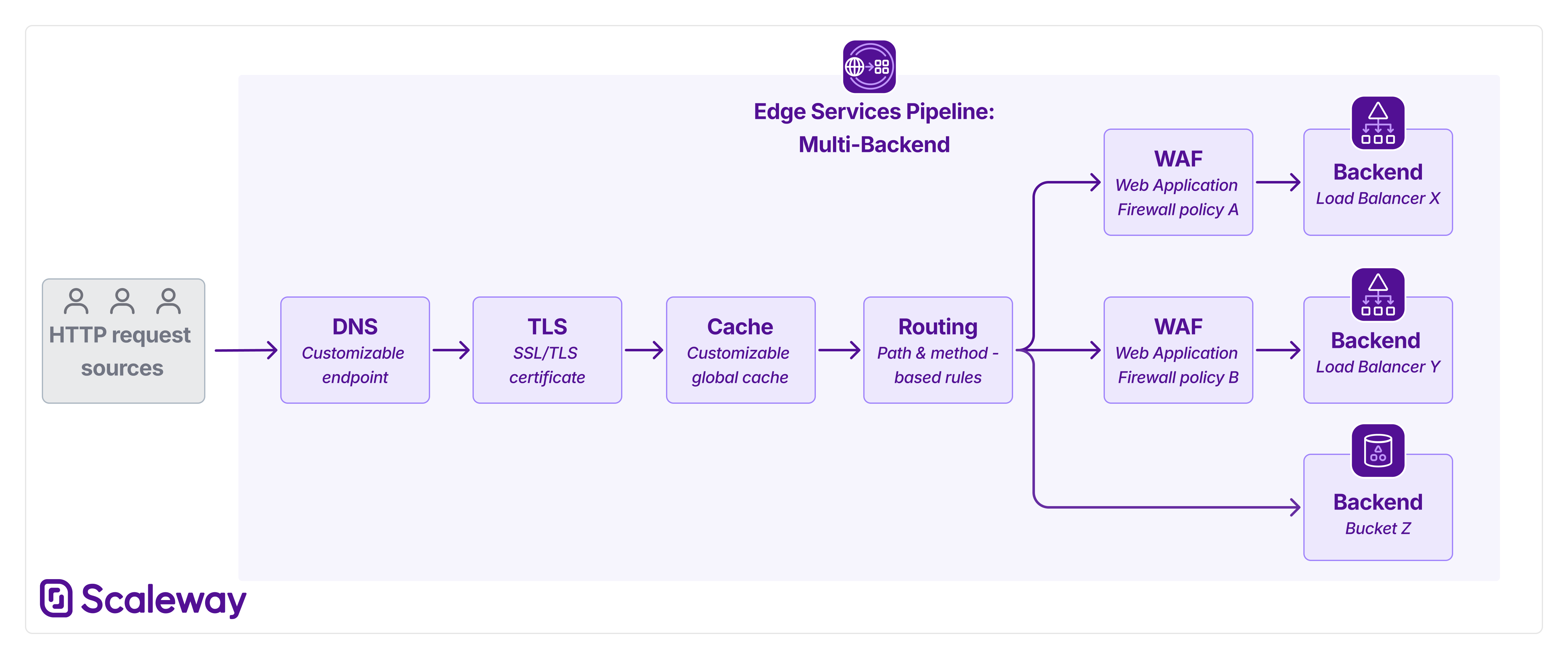
Now, each pipeline can support multiple backends. These can be Load Balancers, Object Storage buckets, or a mixture of both. More backend types will be coming soon. To ensure that traffic reaches the correct background, create routing rules. These rules define filters for URL path and/or HTTP method, and route matching requests towards a specified backend:
WAF in multi-backend pipelines
Previously, when you configured a Web Application Firewall, this was global to the whole pipeline.
With multi-backend pipelines, you can now configure multiple WAF policies per pipeline. Each WAF policy must be associated with a given backend. This gives you the freedom to protect only specific backends with a WAF, leaving other backends WAF-free if desired. You can also choose whether to configure different paranoia levels for different backends, providing greater flexibility and control.
Caching in multi-backend pipelines
There is no change to caching behavior in multi-backend pipelines. Whether your pipeline has one backend or several, the cache (when enabled) is global to the whole pipeline. Routing rules are applied only after traffic has passed through any cache stage.
Routing in multi-backend pipelines
When creating a pipeline, you must designate a default backend, which receives all traffic in the case that no routing rules apply.
You can choose to add no further backends, if you only require a single-backend pipeline. In this case, you do not need to create any routing rules.
If you add more backends, you must create route rules in order for them to receive traffic. These rules set conditions for when requests should be routed to a specific backend, based on URL path and/or HTTP method. When creating a route rule, you can also choose whether it should send matching traffic directly to the specified backend, or to a WAF policy first, for firewall protection.
If you create several route rules (necessary to route to several backends), remember that the order of the rules is important. Rules higher up the list are applied first.
- Traffic is tested against the first rule in the list first: any matching traffic is directly routed to the specified WAF policy/backend.
- Traffic that did not match the first rule is then tested against the second rule. If it matches, the routing rule is directly applied.
- ... and so on, until unmatched traffic arrives at the end of the list of rules.
- The last rule is necessarily the default rule, which dictates where to route traffic that did not match any other rule.
Therefore, when creating route rules, remember to order them from most specific to most general. This ensures that precise, high-priority routing decisions are evaluated first, while broader or fallback rules are applied only to traffic that does not match the earlier conditions.
Terminology changes: from 'origin' to 'backend'
Previously, the term origin was used to describe a Load Balancer or Object Storage bucket that was the target of an Edge Services pipeline. Moving forward, for enhanced clarity, we will use the term backend rather than origin.