Configuring a Site-to-Site VPN customer gateway device
Your customer gateway device is a real physical or software-based networking device, located on the remote network you want to connect to your Scaleway VPC. The customer gateway that you create in Scaleway is a logical representation of this device.
Creating the customer gateway on the Scaleway side does not automatically configure the corresponding physical or virtual device. This must be set up separately by you or your network administrator to establish the Site-to-Site VPN connection.
Wait until you have set up all elements of the Site-to-Site VPN tunnel (VPN gateway, customer gateway, routing policy and VPN connection) before configuring your device. It is only at this stage that you will have all the following parameters and details which are necessary for the configuration.
-
VPN Gateway Public IP(s): The IPv4 address, IPv6 address, or both, that you configured when creating the VPN gateway.
-
Pre-Shared Key (PSK): This is auto-generated upon creation of the connection and stored in Scaleway Secret Manager.
-
Scaleway ASN:
12876 -
IPsec parameters (ESP and IKE security proposals)
-
BGP interconnection subnet: The private subnet used to provide private IP addresses for the VPN gateway and customer gateway over the tunnel. The gateways connect over this private subnet to establish a BGP session and exchange routing information. For connections that are configured to route both IPv4 and IPv6 traffic, one IPv4 and one IPv6 subnet will be provided. Subnet information can be accessed via the VPN connection Overview.
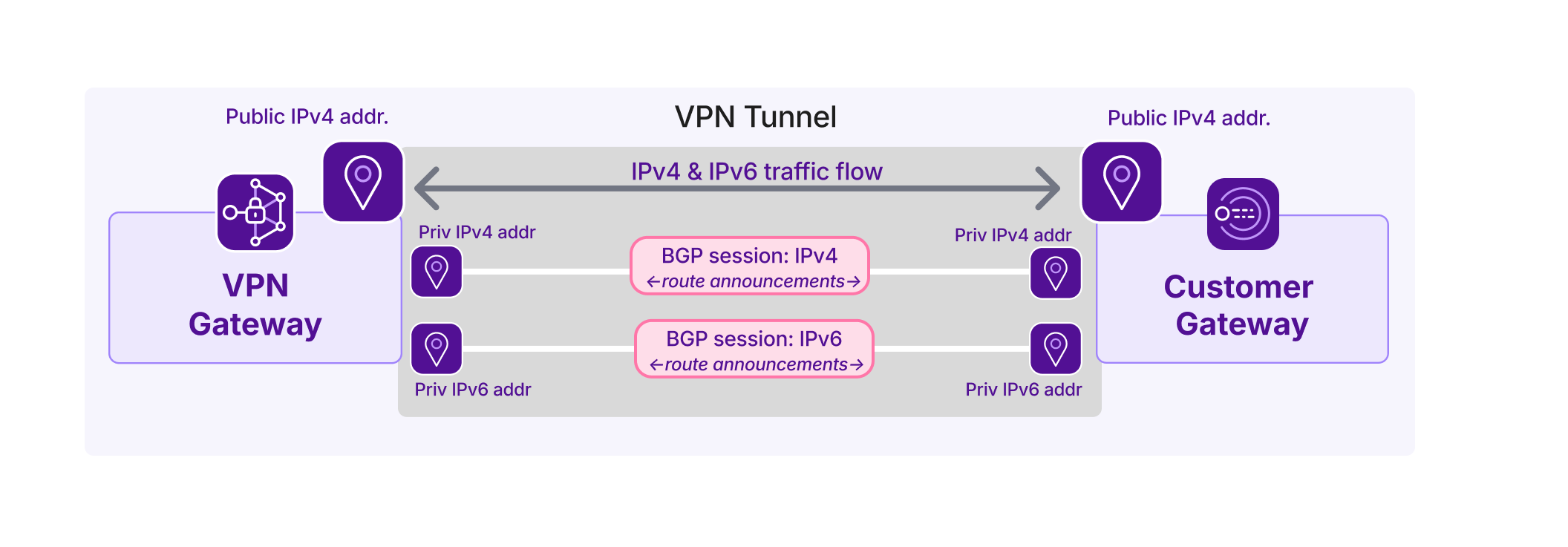
-
Routing policy: You must set up route announcements and filters on the customer gateway device. Take into account the routing policy(ies) you attached to the connection, when configuring routing policy on the customer gateway device.
Specific instructions for configuring your customer gateway device will depend on your device model and vendor.