Shared Responsibility Model for Scaleway Managed Kubernetes Services (Kapsule & Kosmos)
Scaleway’s managed Kubernetes services, Kapsule and Kosmos, provide a fully managed control plane and associated ecosystem components required to run Kubernetes clusters. Scaleway abstracts many operational tasks to reduce customer operational burden, but customers are still accountable for the security, configuration, and operation of their own workloads and cluster configurations.
This model clarifies responsibilities in the following categories:
- “Security of the Cloud”: Scaleway’s responsibility
- “Security in the Cloud”: Customer’s responsibility
- Service‑specific responsibilities for Kapsule and Kosmos
- Specific provisions for Health Data Hosting (HDS)
Responsibilities vary depending on cluster configuration and the presence of external node providers in Kosmos.
What is a managed Kubernetes service?
In the context of Scaleway, a managed Kubernetes service refers to the Kapsule and Kosmos products. Scaleway handles the management and maintenance of the Kubernetes control plane, along with all the crucial core components required for the proper operation of the Kubernetes cluster.
What components of Kubernetes are managed by Scaleway?
Scaleway manages the Kubernetes control plane (either Kapsule or Kosmos), which consists of various components responsible for managing and maintaining the cluster and its state, and scheduling applications. This includes components such as the control plane itself: etcd, API server, scheduler, cloud controller manager, controller manager.
Scaleway takes care of Kubernetes system applications such as CoreDNS, kube-proxy, the Container Networking Interface (CNI), and the Container Storage Interface (CSI), which are required for the normal run of the Kubernetes cluster and its associated resources. Scaleway is also responsible for node provisioning and providing updates of operating system node images.
Scaleway offers support for the latest minor releases and patches, allowing the user to update them regularly on the cluster using our API, CLI, the web console interface, or the Terraform Provider.
Furthermore, Scaleway provides information and reminders when older versions reach their end of support, ensuring that users stay informed and upgrade their clusters regularly.
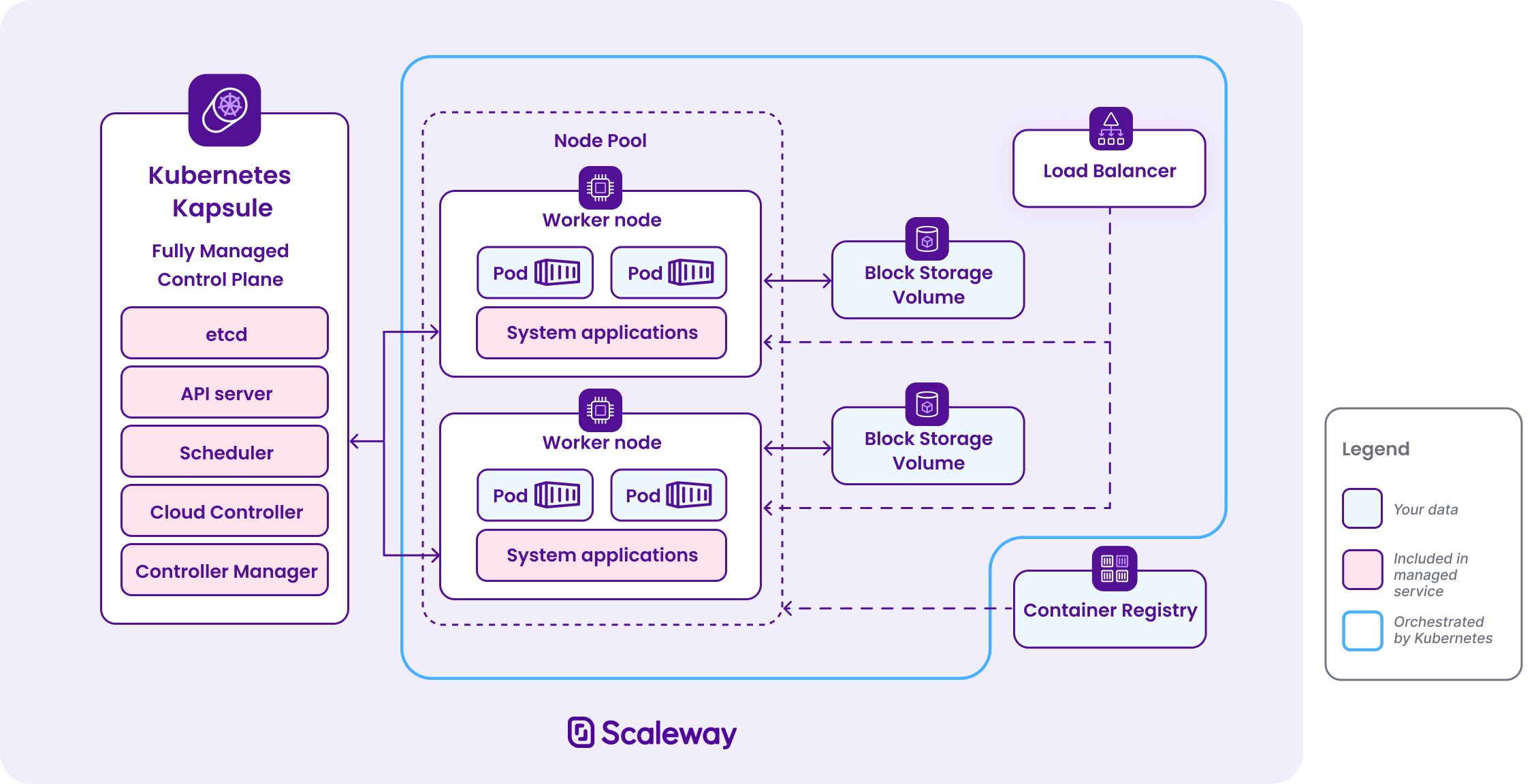
Components and features handled by Scaleway
| Component | Responsibility |
|---|---|
| Control plane | etcd, API Server, Scheduler, Controller Manager, Cloud Controller Manager |
| System add-ons (present on each worker node) | CoreDNS, kube-proxy, CNI, CSI |
| Node images | Published, patched, and maintained by Scaleway for managed node pools |
| Control plane high availability | Multi-AZ deployment options, automatic failover |
| Infrastructure integration | VPC, Load Balancers, Block Storage, IAM APIs |
| Patch & version management | Notifications, EOL planning, auto-upgrade support for patches |
Security of the Cloud (Scaleway’s responsibility)
Infrastructure and platform operations
Scaleway is responsible for providing and maintaining:
- Physical datacenter security, including facilities, access control, and environmental protections
- Networking infrastructure, including underlying physical and virtual networks
- Virtualization stack, underlying APIs, and infrastructure control planes used for cluster provisioning
- Managed Kubernetes control planes, including high availability and redundancy of API servers and cluster state data
- Scaleway-provided features integrated with the platform (e.g., Load Balancers, VPC infrastructure, IAM APIs)
- Scaleway-maintained Kubernetes node images and managed node pool lifecycle automation
Service resiliency and availability
Scaleway is responsible for:
- Ensuring the managed Kubernetes control plane meets availability and resiliency targets defined in product documentation
- Providing multi-AZ (Availability Zone) control plane options where applicable
- Ensuring underlying infrastructure redundancy
- Publishing documented Service Level Agreements (SLAs) for managed control planes
Integration with other Scaleway services
Scaleway ensures integration with managed VPC, IAM, Load Balancers, Block Storage, and other infrastructure services used by Kubernetes clusters, including provisioning via Kubernetes APIs.
Platform security and updates
Scaleway maintains:
- Security patching of infrastructure components and managed control plane components
- Ongoing vulnerability management for services under Scaleway’s control
- Secure and sensible defaults for managed features and integrations
- Customers are notified when versions approach End of Life
Security in the Cloud (User’s responsibility)
Users are responsible for all aspects of Kubernetes cluster configuration and workloads, including but not limited to:
Kubernetes cluster configuration
Users are responsible for:
- Kubernetes resource configuration (Deployments, Services, ConfigMaps, Secrets, Custom Resource Definitions (CRDs))
- Role-Based Access Control (RBAC) and user access permissions
- Admission controls and namespace governance
- Pod security policies and policies enforced through the Kubernetes API
- Network policies within the cluster
- Audit logging (for dedicated offers), logging retention, and observability configuration
Node pools, images, and workloads
When using Scaleway’s managed node pools:
- Users define the node pool size, instance types, and scaling policies
- Users choose when to trigger node upgrades or rolling image updates
- Users are responsible for workload compatibility
When defining custom user-data on a Scaleway-managed node pool:
- Users are responsible for troubleshooting issues caused by cloud-init scripts (user-data named "cloud-init" may break nodes)
For custom or external nodes (e.g., in a Kosmos cluster that attaches external non-Scaleway compute):
- Users are responsible for node provisioning and lifecycle
- Users must ensure operating system security, patching, and hardening
- Users must manage networking connectivity, firewall rules, and node bootstrap configurations
When defining custom user-data on a custom or external node pool:
- Users are responsible for troubleshooting issues caused by cloud-init scripts (user-data named "cloud-init" may break nodes)
Networking and VPC security
The user is responsible for:
- Designing VPC segmentation and subnets
- Configuring firewall rules (Access Control Lists (ACLs)) and security groups
- Managing public exposure of services
- Configuring TLS certificates, ingress rules, and DNS
Identity, access management, and credentials
Users are responsible for:
- IAM policies within their account/project
- Authentication and authorization for cluster access
- Secure storage and rotation of Kubernetes credentials, tokens, and API keys
- Managing least-privilege access for users and applications
Workload security and data protection
Users must ensure:
- Container images are appropriately scanned, secured, and trustworthy
- Application-level encryption in transit and at rest where required
- Backup and restore strategies for application data and stateful workloads
- Logging and monitoring are configured to meet compliance and audit requirements
Add-ons
Scaleway is responsible for:
- Providing managed add-ons (for example, CSI drivers, default CNI components, CoreDNS, or NVIDIA GPU Operator)
Users are responsible for:
- Configuring these add-ons according to their specific needs when applicable
- Monitoring and maintaining compatibility with cluster workloads
- Evaluating third-party add-ons or custom extensions not maintained by Scaleway
Mutualised vs Dedicated
Kubernetes control plane varies depending on whether it is a shared or dedicated environment, and by the specific dedicated resources that you choose.
See the overview of Kubernetes control plane offers to understand the differences between dedicated and mutualized offers.
Cluster variants: Kapsule vs Kosmos
Kapsule
In Kapsule clusters, the control plane and managed node pools are operated by Scaleway:
- Users define cluster resource configuration and workload placement
- Managed Kubernetes images and node pool automation are provided
Kosmos
Kosmos extends managed Kubernetes to support multiple infrastructure sources:
-
Scaleway-hosted nodes:
-
Scaleway-hosted nodes behave like Kapsule nodes; Scaleway manages node provisioning and image publishing, while users manage workloads and configurations.
-
While Scaleway manages the host infrastructure, hypervisor, and physical security, customers remain responsible for the workload security, and cluster-level policies - consistent with this Kubernetes SRM.
-
-
External nodes:
- Nodes hosted outside of Scaleway are under the full responsibility of the user for OS patching, security hardening, connectivity, and health monitoring.
- Scaleway continues to manage the Kubernetes control plane for the combined cluster.
Version lifecycle and End‑of‑Support policy
Scaleway’s Kubernetes version policy requires customers to:
- Track deprecation notices and notifications
- Engage in Kubernetes minor and major version upgrades
- Enable the auto‑upgrade feature for patch version updates within supported minor releases
- Replace nodes at or preferably before the lifecycle limits recommended by the platform
Scaleway may perform scheduled upgrade assistance for unsupported versions to guarantee operational continuity, but customers must validate workloads before and after such changes.
Scaleway supports each Kubernetes minor version for at least 12 months after initial release.
Lifecycle stages
| Stage | Description | Corresponding Action |
|---|---|---|
| Release | Version available for new clusters and upgrades | Optional upgrade |
| Deprecation | No longer available for new clusters; existing clusters notified via support ticket | Version upgrade |
| End of Support (EoS) | Automatic upgrade triggered within 30 days to next supported minor version | Validate workloads post forced upgrade |
Notifications:
- Deprecation: Announced in the Changelog
- EoS: Communicated via console support ticket and scheduled maintenance notice
Scaleway may perform forced upgrades for unsupported versions, but workload compatibility is the customer’s responsibility.
Usage compliance
Users must ensure that their usage of the Kubernetes services complies with Scaleway’s Terms of Service, applicable laws, and industry-specific compliance requirements (GDPR, HIPAA, SOC2, etc.).
Data protection and encryption
Users are responsible for:
- Ensuring encryption of sensitive data at rest and in transit inside workloads
- Managing keys and certificates as needed for compliance
- Implementing backup and retention policies consistent with regulatory obligations
Scaleway provides infrastructure to support such features but does not manage user data content or application encryption.
Data deletion and resource lifecycle
Users must explicitly delete or manage resources (clusters, node pools, volumes, network components, credentials). They can use Kapsule API to synchronously delete Scaleway resources attached to an existing cluster.
Scaleway will remove infrastructure components upon termination but is not responsible for retaining or restoring user workloads or data.
Incident response and remediation
Scaleway is responsible for:
- Restoring control plane to functional state after unforeseen infrastructure events
- Providing observability data and recommendations following platform‑level failures
Customers are responsible for:
- Diagnosing workload‑level failures
- Correcting misconfigured resources
- Restoring application state and dependent workflows
Specific provisions for Health Data Hosting (HDS) with Kapsule Dedicated offer
This section describes the specific requirements and responsibilities for hosting health data (or the transit of such data) in accordance with the HDS regulatory framework.
When processing health data using the Scaleway Kapsule product, users are responsible for:
- Signing the Scaleway HDS contract
- Creating Kapsule clusters specifically dedicated to processing HDS-compliant data
- Ensuring that access to these clusters is restricted following least-privilege rules
- Following Scaleway's general documentation on ensuring HDS compliance
Scaleway is committed to providing an HDS-certified infrastructure and maintaining this certification.
Backup
Users are responsible for backing up their data with appropriate storage solutions such as HDS block storage. Scaleway must back up Kapsule control-plane configuration and remain able to restore cluster state after cluster malfunction, if any.
Data residency
So that Scaleway can guarantee that data processing remains within authorized data centers in Paris, users must:
- Create Kapsule clusters only in the Paris authorized region (fr-par)
- Create associated storage and network resources in the Paris region
- Not route cluster traffic outside of the
fr-parregion
Identification of HDS-compliant resources
Users are responsible for:
- Identifying which resources (Load Balancers, Instances, Block Volumes) are HDS-compliant
- Attach only such resources to the HDS-compliant Kapsule cluster
Data encryption
Health data must be encrypted in transit.
Users are responsible for:
- Enforcing HTTPS for ingress and egress cluster traffic, i.e., accordingly configuring load balancers and gateways
- Handling certificate generation and renewal for transit
- Handling block volume provisioning and encryption with Kapsule CSI and encryption key management
Scaleway is responsible for:
- Providing a secure L2 private network on which cluster worker nodes and control-plane traffic is routed
- Providing compliant Storage APIs to store health data at rest with Kapsule CSI
- Managing and renewing the key used to encrypt the cluster configuration in the etcd database
Logs and traceability
Users are responsible for:
- Configuring and maintaining monitoring and tracing solutions for their workload, eventually using Scaleway's Cockpit solution
- Activating and configuring Scaleway’s Audit Trail solution
Scaleway is responsible for:
- Providing metrics and logging interfaces to monitor control-plane components (including Audit Trail capabilities)
Reversibility
Since Scaleway Kapsule is not a specific Kubernetes distribution and most of its components are open source, users can simply export all their Kubernetes YAML resources to another managed Kubernetes service provider. The only change to consider is using the new provider's APIs (IAM, block storage, VPC, etc.). Here is a simple example:
-
Assess and document current cluster resources.
Begin by documenting your existing cluster configuration. This includes namespaces, deployments, services, storage, and any custom resources or policies in use.
-
Inventory of resources:
- Namespaces: List all namespaces in use.
- Deployments and StatefulSets: Identify all applications and workloads running.
- Services: Document LoadBalancers, NodePorts, ClusterIPs.
- ConfigMaps and Secrets: Export configurations and sensitive data.
- Ingress Controllers: Note any Ingress resources and controllers used.
- Persistent Volumes and Claims: List all storage resources.
- Custom Resource Definitions (CRDs): Document any CRDs and associated operators.
- Network Policies: Record any network policies in place.
-
Export manifests. Use
kubectlto export the manifests of your resources:kubectl get all --all-namespaces -o yaml > cluster-resources.yaml kubectl get pvc --all-namespaces -o yaml > pvcs.yaml kubectl get configmaps --all-namespaces -o yaml > configmaps.yaml kubectl get secrets --all-namespaces -o yaml > secrets.yaml kubectl get ingress --all-namespaces -o yaml > ingress.yaml kubectl get crd --all-namespaces -o yaml > crds.yaml
-
-
Migrate container images to your new container registry.
Your new cluster will need access to your container images.
-
Create and configure a new Kubernetes cluster.
-
Configure kubectl on your new Kubernetes cluster.
-
Adapt Kubernetes manifests and configurations.
Your existing manifests may contain cloud-provider-specific settings that need adjustment to align with the new provider’s configuration.
-
Migrate persistent data and storage.
-
Back up data from your existing cluster. Use appropriate tools to back up data from Persistent Volumes. Methods include:
- Database dumps: For databases, perform data exports.
- File system copy: For file storage, copy data to a temporary location.
-
Restore data to a newly created cluster.
- Create PersistentVolumeClaims in your new cluster.
- Restore data into the new volumes:
- Init containers: Use init containers to populate data.
- Data import jobs: Run Kubernetes jobs to import data.
-
-
Deploy applications to your new cluster.
-
Update networking and DNS configurations.
-
Test and validate deployments.
Conduct functional, performance, and end-to-end tests to verify that the applications work as expected in the new environment.